How to set up an account with the payment provider Przelewy24
⏱️ You’ll read this article in
about 7 minutes
Learn the steps you need to take to start receiving payments
from customers.
Before you start selling on empik.com, you need to register on Przelewy24 (P24). Even if you already have a Przelewy24 account, you must create a separate account which will be used exclusively for Empik-related transactions.
 If you have multiple Empik Seller accounts, each one
requires a separate P24 registration.
If you have multiple Empik Seller accounts, each one
requires a separate P24 registration.Instruction for Sellers registered outside Poland
To complete the registration process, you need to:
- fill in the registration form,
- sign the agreement,
- make a verification transfer,
- provide documents (only if you don’t already have any existing Przelewy24 account).
1. Fill the Merchand Card
Download the Merchant Card available here and fill it on your computer.
We recommend saving it in the PDF format.
It is crucial to add an e-mail address that has not previously been used on the Przelewy24 website, otherwise the system will not accept it.
2. Send file to our Support Team
Send the filled-in Merchant Card to our Support Team at support-marketplace@empik.com. We will verify the document and send it to Przelewy24.
3. Sign the contract
Przelewy24 prepares a contract based on information provided in the Merchant Card. The contract will be sent to the email address you put in the Merchant Card.
When you receive the contract, print it, sign it and send a scan of the signed contract to Przelewy24 at empik.business@przelewy24.pl.
4. Send the signed contract
Additionally, send two identical, signed physical copies of the contract to Przelewy24.
Przelewy24 address:PayPro SAul. Pastelowa 860-198 PoznańPOLAND
5. Deliver additional documents
After verification of the application, Przelewy24 will inform you about next steps and any additional documents you should provide.
List of the necessary documents:
- proof of identity, and PEP statement from the representative
- PEP statement from the beneficiary
- founding act of the company
- extract from the registry of beneficial owners (only EU)
- if you have a foreign bank account – printout from online banking (PDF) or a document issued by the bank, P24 does not accept screenshots
- UBO statement (if the company has extensive ownership structure)
6. Process completed
After finishing all these steps you'll have access to your Przelewy24 panel where you'll find all funds transferred from your Empik sales.
If the registration process has been completed correctly, you'll find your Przelewy24 ID in Seller Management Centre in the Finances > Settlements tab.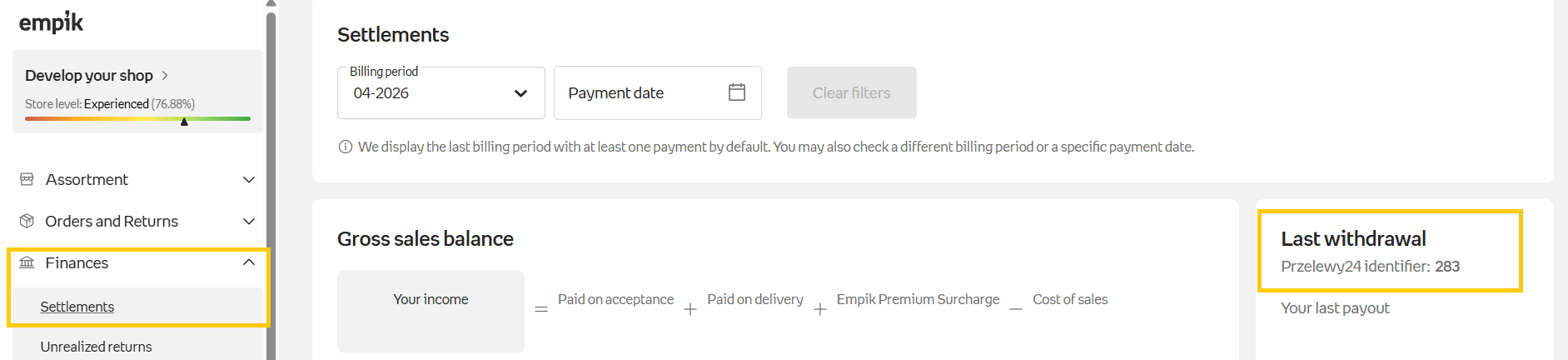
If you change your company details or bank account number, you'll have to update them both in the Empik panel and Przelewy24 panel.
Instruction for Sellers registered in Poland
- Log in to the Seller Management Center.
- Click Activate Store in the top-left corner.
- In the Register with Przelewy24 section, click Go to the form.
Some data will be filled in automatically.
Do not log in directly through Panel24 - use the link available in the Management Center.
Contact Form. Step 1: Company Details
The Przelewy24 form is partially completed with data imported from the Empik system. The following information is filled in automatically:
- business type, company name, TAX ID (NIP), REGON,
- email address, phone number, bank account number,
- country, city, postal code, street address.
If you notice any inaccuracies, you can edit this information.
Each P24 account requires a unique email address. This is a Przelewy24 requirement and is not regulated by Empik.
Contact Form. Step 2: Representatives and Contact Details
- Representative:
Enter the details of the person authorized to represent the company according to the relevant register (e.g. KRS, CEIDG). - Contact Person:
The contact person’s details will be filled in automatically, but you can change them at any time: - first and last name,
- email address,
- phone number.
Contact Form. Step 3: Your Stores
The following information will be filled in automatically:
- website address (empik.com is correct - do not change it),
- business category - the closest match to your business activity.

Each of your stores must have a separate Przelewy24 account. Do not use the “Add another store” option.
Contact Form. Step 4: Accepting the Agreement
Accept the terms and conditions of Przelewy24.
Contact Form. Step 5: Account Activation
If it’s your first Przelewy24 account
After clicking Complete the registration process, you will receive an email at the address specified in the agreement containing your login details for the Przelewy24 Panel. Click the link in the email to log in.
Provide the email address you will use for communication with Przelewy24.
Step 6: Bank Account Verification
- Go to: My Account > Agreement Details > Bank Account Verification.
- Complete the verification transfer (cost: PLN 1.50) by clicking Pay online.
Step 7: Submitting Documents
- Go to: My Account > Agreement Details > Upload Documents.
- Attach scans of the required documents, depending on your business type.
Step 8: Your Przelewy24 Identifier
Once the entire verification process is completed, you will find your P24 identifier in the Settlements tab in the Seller Management Center.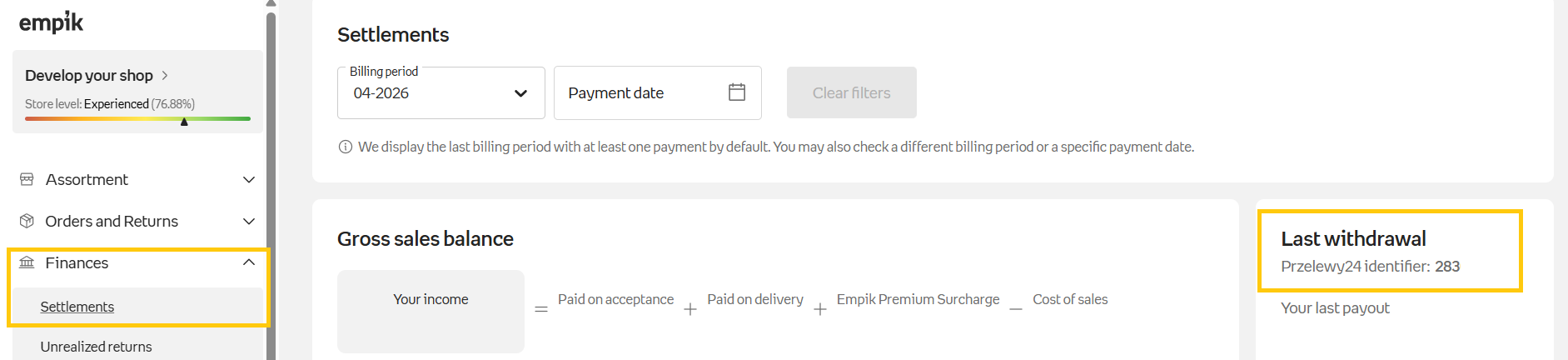
If you already have a Przelewy24 account
- After clicking Complete the registration process, you will receive an email at the address specified in the agreement containing your login details for the Przelewy24 Panel. Click the link in the email to log in.
- Provide the email address you will use for communication with Przelewy24.
- Once the entire verification process is completed, you will find your Przelewy24 ID in the Settlements tab in the Seller Management Center.
We hope this article was helpful. Your next step: Setting up delivery methods.